1. Home
  2. Devices
  3. Nutri Group
  4. Nutri GROUP – light messages – buttons and diode
  1. Home
  2. Devices
  3. Nutri GROUP – light messages – buttons and diode

Nutri GROUP – light messages – buttons and diode

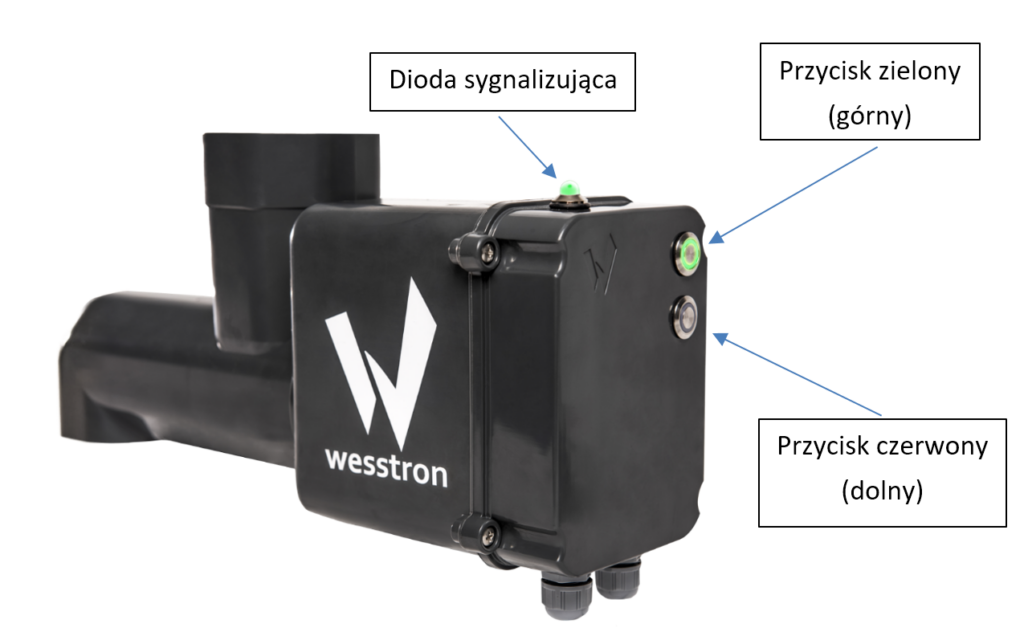
Diagram of the Nutri GROUP dispenser housing with labeled parts: the indicator diode on top, and the green (upper) and red (lower) buttons on the side of the unit.
Nutri GROUP dispenser – indicator light and buttons

Indicator light on the housing

ColorThe way the diode glowsCondition of the device
Icon showing the indicator diode lit steady green, used in the Nutri GROUP indicator light status legend.PulseFeeding Unlocked
Icon showing the indicator diode lit steady purple, used in the Nutri GROUP indicator light status legend.PulseFeeding blocked
Icon showing the indicator diode blinking red, used in the Nutri GROUP indicator light status legend to indicate an alarm condition.FlashingAlarm condition / Alarm reported [1].
Icon showing the indicator diode lit steady light blue, used in the Nutri GROUP indicator light status legend.Flashing / ContinuousNo connection
(check communication cables)

NOTE!
A DIODE THAT BURNS WITH A CONTINUOUS LIGHT IN A SITUATION NOT LISTED ABOVE INDICATES A FAULTY OPERATION OF THE DEVICE. IT IS RECOMMENDED TO DISCONNECT AND RECONNECT THE DISPENSER TO THE POWER SUPPLY TO RESTART.

[1]
To validate the alarm, press and hold the red button for a minimum of 3s. The correct pressing of the button will be signaled by its blinking. Validation of the alarm will be signaled by stopping the blinking of the red LED.
To report an alarm, press and hold the red button for a minimum of 3s. The correct pressing of the button will be signaled by its blinking. Triggering of the alarm will be signaled by blinking red LED.
NOTE! The condition for reporting an alarm is that it is not on the device beforehand.

Buttons

ColorThe way the diode glowsCondition of the device
Diagram of the two dispenser buttons with the upper button lit steady green, indicating feeding is unlocked and the dispenser is working correctly.Green – continuousFeeding Unlocked
Correct work
The dispenser works according to the configuration
Diagram of the two dispenser buttons with both lights off, used in the Nutri GROUP button status legend.NoFeeding blocked
Dispenser does not feed
Additionally signaled by the top purple indicator light
Diagram of the two dispenser buttons with the lower button lit red, indicating feeding is blocked on the dispenser.3 x blinkThe device is in the process of feeding or the scheduled dose has not yet been dispensed

NOTE!
A DIODE THAT BURNS WITH A CONTINUOUS LIGHT IN A SITUATION NOT LISTED ABOVE INDICATES A FAULTY OPERATION OF THE DEVICE. IT IS RECOMMENDED TO DISCONNECT AND RECONNECT THE DISPENSER TO THE POWER SUPPLY TO RESTART.

Updated on 2026-07-23
Was this article helpful?

Related Articles

Need Support?
Can't find the answer you're looking for?
Contact Support

Leave a Comment