1. Home
  2. Devices
  3. Micrclimate SK4
  4. Climate controller – changing the set temperature.

Climate controller – changing the set temperature.

(1) To change the set temperature settings on the climate controller, select the “Desktop” tab from the side navigation menu on the left.

2 The next step is to go to the “Climates” tab from the top menu. Being on the climate tab and seeing the climate controllers located on the farm, we right-click on the controller whose settings we want to change.
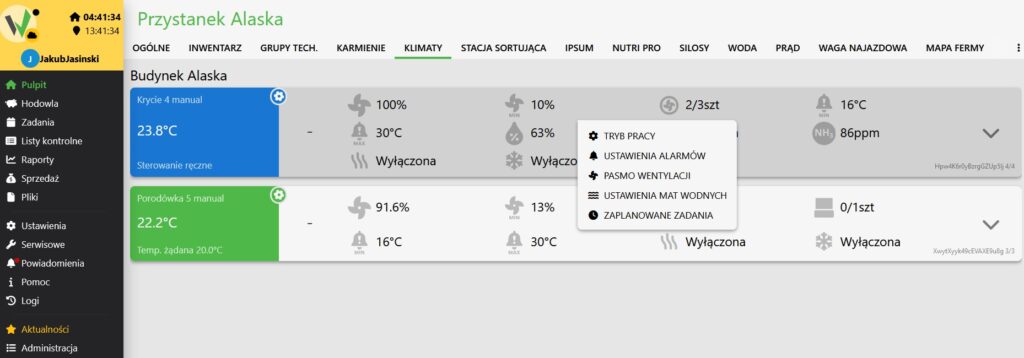
Climates tab showing building chambers with a right-click context menu open, listing "TRYB PRACY" (Operation Mode), alarm settings, ventilation band and other climate controller options.

3 Go to the “Operation Mode” function. Here we have the ability to change the set temperature. The climate controller in this mode adjusts ventilation to the set temperature.
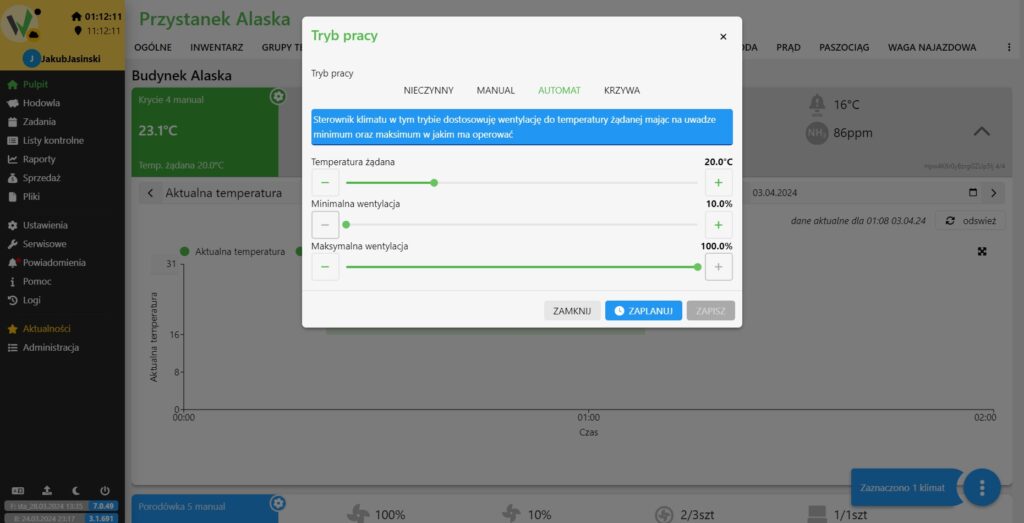
"Tryb pracy" (Operation Mode) dialog with the AUTOMAT mode selected and sliders for set temperature, minimum ventilation and maximum ventilation.

Updated on 2026-07-23
Was this article helpful?

Related Articles

Need Support?
Can't find the answer you're looking for?
Contact Support

Leave a Comment